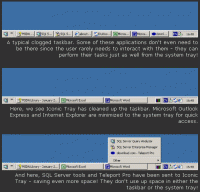
This tiny utility lets you minimize any window either to the system tray, or to a special new tray (see image). This helps you keep your taskbar clean for often used apps. Minimizing can be carried out with mouse clicks and/or system-wide hotkeys.
Iconic Tray is a tiny utility which lets you minimize any window either to the system tray (notification area in Windows XP), or to a special new tray provided by Iconic Tray itself (see image). Whichever method you choose - bye bye those clogged up taskbars!
Iconic Tray is very useful to hide seldom used or background applications which occupy your taskbar and hinder quick switching among those you use most often. Moreover, minimized applications use less processor time and memory - your system performance may even increase!
Minimizing to the Iconic Tray and/or the system tray is easy: simply right-click (or middle-click) on the window's "Minimize" button. Anytime you want to view the minimized windows, just open the Iconic Tray icon to see a menu list - click on a window in the list and it's back on screen again. It really is that easy. Of course, if you had chosen to minimize to the system tray, just restore your window as you would any other tray icon.
As small as it is, Iconic Tray will do this job admirably - and what's more, it's simple to configure too. The icon for Iconic Tray can appear either as a small button next to the system tray, or as an icon in the system tray itself. The preferences dialog allows you to change all the default settings, plus, you can define system wide hotkeys to carry out all the functions mentioned above. Whats new in version 1.21: Fixed: Sometimes (very rarely) Iconic Tray locks taskbar. Operating system: Win95,Win98,WinME,WinXP,WinNT 4.x,Windows2000,Windows2003 Limitations: nag-screen Release notes: Minor Update
Tired of boring icons on your PC? Get Bee Icons, the best icon manager that will return the excitement to desktop by replacing standard icons. One click and you won't even recognize old desktop ? bright colors, eye-catching icons, groovy look.
Price: $19.95, Rating: 5, Downloads: 78 Download
BatteryWatch is a tiny tool for notebook owners that shows the remaining battery capacity in an icon in the explorer status bar. A log file is written in order to monitor the battery lifetime.
Price: $0, Rating: 10, Downloads: 53 Download
User Rating
Rating:2.2 out of
5 Based on13 ratings.
13 user reviews.

 Iconic Tray 1.21 details